Empowering primary and high school learners with foundational coding skills through fun, interactive, and age-appropriate programming education.
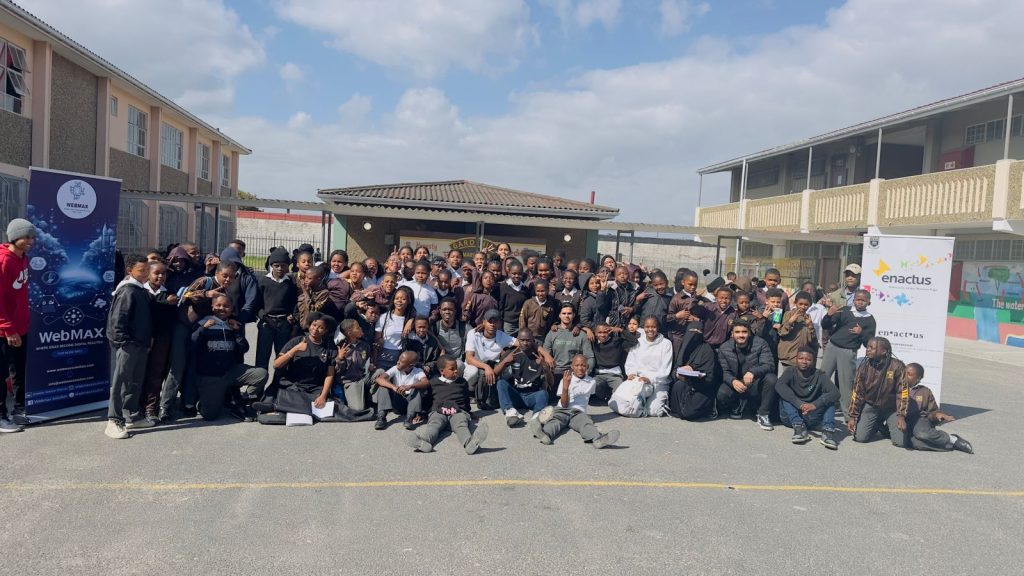
We offer 7-week programmes that introduce learners to the world of coding and technology
through multiple, structured learning pathways. Using a progressive and age-appropriate
approach, learners develop computational thinking and problem-solving skills in an engaging
and accessible way.
Grades 3-12 learners (Primary & High School)
7 weeks of hands-on learning
after-school sessions
Certificate of completion
A screen-light introduction to coding concepts using unplugged and low-tech activities. Learners explore sequencing, logic, and problem-solving through physical activities, games, and visual tools, building a strong foundation without the need for devices.
A gamified, block-based coding program where learners create interactive stories, animations, and games using virtual coding blocks. This programme introduces programming concepts in a fun and intuitive way, making coding accessible for beginners.
A transition into text-based programming using Python. Learners apply computational thinking to solve real-world problems, build programs, and develop practical digital skills aligned with future technology careers.
A carefully structured 7-week curriculum that builds skills progressively
Day 1
Introduce action commands – directional movement, and shooting.
Learners may try brute-force commands instead of using repeat.
Use tokens physically before digital play. Keep learners moving.
Day 2
Reinforce repeat use in puzzles.
“Why efficiency and cleanliness of code is important in coding?
How does repeat save time compared to many forward commands?”
Let learners compare long vs. efficient solutions.
Day 3
Introduce while loops.
Learners confuse for vs while.
“What’s the difference between repeating a fixed number vs until a condition?”
Use real-life analogy (walk until you reach the door).
Day 4
Apply loops to minimize steps.
“How do loops help us solve problems faster?”
Run a competition: fewest tokens wins.
Day 5
Introduce planning before coding.
“How does planning help avoid mistakes?”
Use everyday routines as pseudocode examples.
Day 6
Practice implementation.
“What changed between your plan and what you did?”
Let learners compare planned vs actual execution.
Day 7
Teach loops within loops.
Learners may forget inner loop resets.
“Where have you seen patterns repeat within patterns?”
Demonstrate with drawing shapes (e.g., 4 sides × 3 steps).
Day 8
Apply nested loops to group challenges.
“Which patrol strategy was most efficient, and why?”
Groups present their patrol solutions.
Day 9
Introduce stopping when goal reached.
“Why must steps be in the right order?”
Use the puzzle to show sequencing importance.
Day 10
Use decisions in code.
“Where do we use decisions in real life?”
Roleplay: “If it rains, else if it’s sunny”.
Day 11
Identify and fix errors.
“What mistakes did you spot, and how did you fix them?”
Show a wrong code and ask learners to fix it.
Day 12
Emphasize correct order and review.
“What happens if we change the order of commands?”
Learners swap pseudocode and test each other’s work.
Day 13
Design original puzzles/projects.
“How can you combine loops, if-else, and planning?”
Encourage creativity — groups design their own levels.
Day 14
Present projects.
“What did you enjoy most, and what did you learn about coding?”
Let peers play each other’s levels and vote for most creative/efficient.
7 Week Program: Scratch Curricular Schedule
Day 1
Navigate the Scratch UI and understand that instructions occur in a specific order.
N/A
Scratch interface and sequencing
Day 2
Use “When Sprite Clicked” triggers to initiate animations and sounds.
Interactive Greeting Card
Event-driven programming
Understand the X and Y Cartesian coordinate system on the Stage.
Sprite Race
Motion and coordinates
Program continuous sprite movement and edge-bouncing logic.
The Aquarium
Iteration using forever loops
Day 5
Introduce basic sensors and detect when a sprite touches a specific color wall.
Color-Sensing Maze
Conditional logic (If-Then)
Day 6
Create and modify a “Score” variable that increases upon a collision event.
The Apple Catcher
Variables and data storage
Day 7
Use operators (>, <, =) to compare user input with correct answers.
Math Quiz Bot
Boolean logic and operators
Day 8
Coordinate interactions between multiple sprites using Send and Receive blocks.
The Stage Play
Sprite communication
Day 9
Simulate walking or flying cycles using Next Costume blocks.
Flying Cat Adventure
Costume-based animation
Day 10
Use the Pick Random function to place sprites at varied locations.
Thunderstorm Simulation
Random values
Day 11
Program a sprite to draw squares and triangles using repeat loops.
Geometric Artist
Drawing with code
Day 12
Identify and fix logical errors in a pre-made, non-functional project.
The Broken Game
Debugging and problem solving
Day 13
Identify a problem and draft a design brief for a final Scratch project.
IDMEC: Design Brief
Project planning
Day 14
Complete the project and present it to the class in a Gallery Walk format.
Final Build & Share
Presentation and reflection
7 Week: Transition and Python Curriculum
Recommended for (Grades 7–8) learners, or learners who have previously completed the scratch program, or
learners who have previous experience in coding.
Day 1
Map Scratch blocks to Python’s print() and input() functions.
The Python Translator
Transitioning from block-based to text-based coding
Day 2
Differentiate between strings, integers, and floats and learn basic syntax rules.
Personal Info Bot
Python data types and syntax
Day 3
Design a visual flowchart representing a logical sequence before coding.
The Daily Routine Flow
Algorithm planning and flowcharts
Day 4
Use Python to perform calculations involving user-provided prices.
Tax / Change Calculator
Arithmetic operations
Day 5
Implement conditional logic to determine pass or fail outcomes.
Grade Checker
Conditional statements
Day 6
Use and, or, and not to create multi-condition logic.
Security Gate Logic
Boolean logic
Day 7
Create a loop that continues until a secret number is guessed.
The Guessing Game
While loops
Day 8
Understand when to use a while loop versus fixed repetition.
Countdown Timer
Loop control
Day 9
Use the turtle library to draw symmetrical shapes.
Symmetrical Shapes
Graphical drawing with Turtle
Day 10
Define reusable blocks of code that accept arguments.
The Greeting Function
Functions
Day 11
Store and access multiple items in a list by index.
Bucket List App
Lists and collections
Day 12
Identify a local problem to solve using a program.
Problem Definition
Problem analysis
Day 13
Code a text-based Python solution to the identified problem.
Solution Development
Program development
Day 14
Review peer code and identify improvements.
Code Audit
Debugging and optimization
Benefits for students, parents, and schools
Students gain confidence in technology and problem-solving
Collaborate with classmates in a supportive environment
Develop innovative solutions to real-world problems
Age-appropriate content with experienced facilitators
Choose the plan that works best for your learning journey
3 Months
10 Months
Per Month
Join hundreds of students who have already discovered the joy of coding with Tech Forward.

techforward@webmaxcodingacademy.co.za www.webmaxsolution.com
Robert Sobukwe Rd, Bellville, Cape Town, 7535